
Web Push Notifications That Bring Customers Back
Bring opted-in visitors back with relevant offers, reminders, and follow-up messages. Umbrella helps you plan web push campaigns around your audience, available website events, and business goals.
Give Visitors a Reason to Return With Personalized Web Push
Umbrella web push helps you reconnect with opted-in visitors through timely offers, reminders, and supported automations.
An Automated Solution To Reach Users Even When They Aren’t On Your Website
- Increase your sales and customer retention
- Send personalized notifications, relevant reminders and offers
- Plan cart reminders and targeted offers where your website integration supports the required events
- Reconnect with subscribed visitors when they are away from your website
- Reach subscribers on supported browsers and devices
- Audience segmentation based on available customer and website data
- Guided setup based on your website and supported workflows
- Real-time tracking and analytics
Easily create targeted push notifications that engage your customers
Use available website events and customer data to build relevant audiences and follow-up. Supported tracking and identification are reviewed during setup.
Communicate with your customers in real-time.
Send relevant offers and reminders to subscribed visitors on supported browsers and devices. A clear call to action gives customers a direct path back to your website; delivery depends on permissions and platform settings.
Increase Conversion Rates
Invite visitors to subscribe through their browser permission flow, then send relevant web push messages that encourage a return visit.
Automate Your Engagement
Plan automated notification sequences around supported events and audience segments. Confirm tracking, permission, content, and timing before launch.
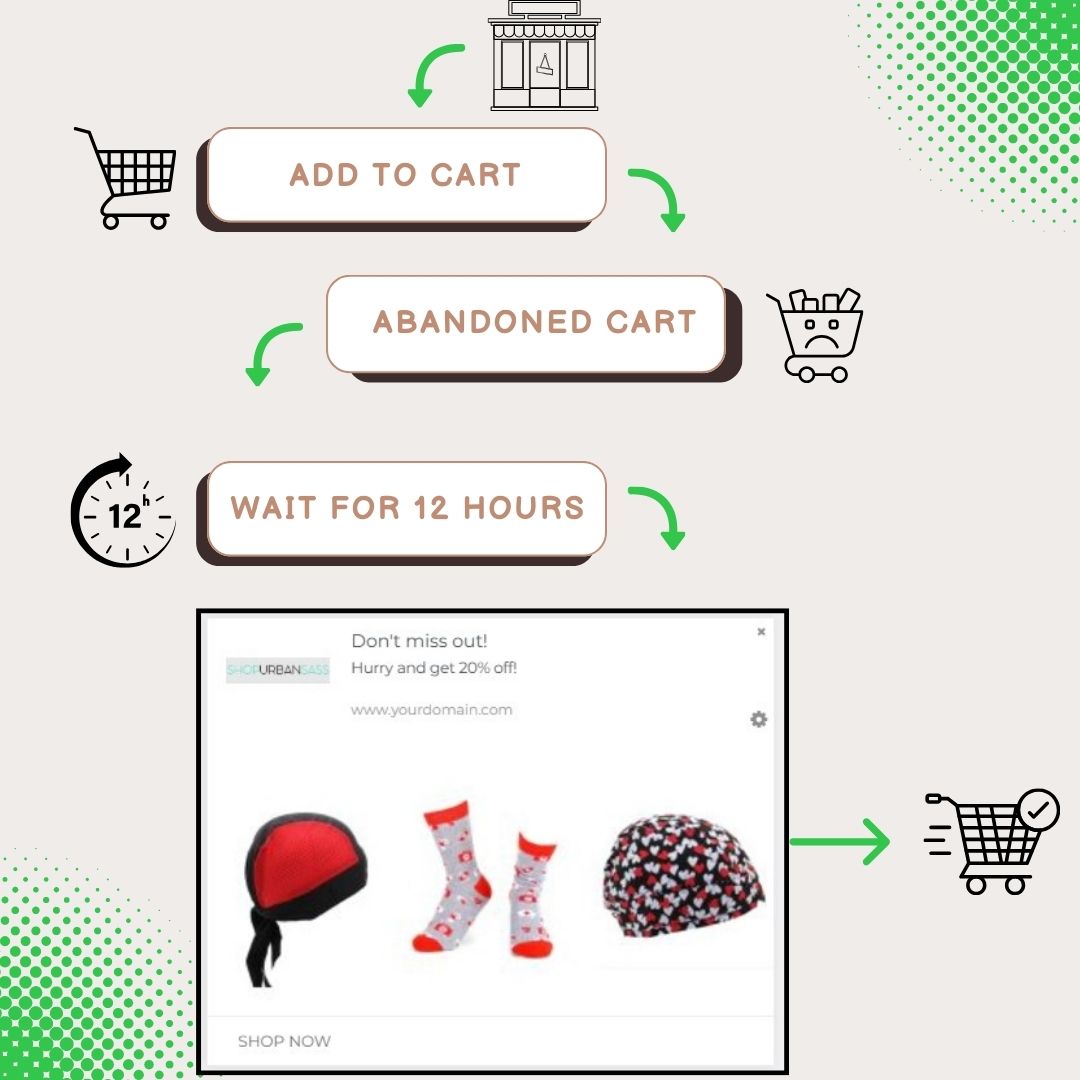
Recover Abandoned Carts
Remind opted-in shoppers about a cart they left behind, where cart events and tracking are available. Review eligibility, timing, and your destination link before launching a recovery campaign.
Here’s What You Get By Signing Up Now
Web push availability depends on browser, device, operating system, and subscription setup. We review compatibility during onboarding.
Push Automation
Up your web push message scheduling game. Optimize for best times and personalize your messages based on segments to get maximum results.
Triggers And Actions
Gauge visitor’s interest, intent, and motivations before sending out push notification alerts. Set trigger notifications and define actions based on user activity on your website.
Live Tracking
Review the delivery and engagement metrics available for your setup. Compare notification clicks and available attributed results to guide your next campaign.
Higher Opt-ins
Offer browser-based subscriptions without requiring an email address. Permission steps and availability vary by browser and device.
Launch & campaign support
Work with the Umbrella team on setup, launch, and campaign questions through the support channels agreed for your account.
Smart Campaigns
Choose a campaign goal, define the audience, and test a relevant message. Use engagement and available attribution to decide what to improve next.

Measure What Your Notifications Contribute
Review supported cart-recovery activity and attributed results.
Track notification clicks and compare campaign engagement.
Use campaign insights to refine audiences, content, and timing.
Build your next return visit.
Talk with Umbrella about your website, subscriber growth, and supported campaign workflows.
Prefer expert help with campaign planning and execution? Explore Done-for-U™ managed marketing.
